Linux Server Hardening: A Practical Review Checklist
A practical, evidence-first Linux VPS security checklist covering SSH access, least privilege, exposed ports, Nginx, TLS, updates, logging, backups, and safe deployment.
A Linux VPS can appear healthy while carrying avoidable risks: an SSH configuration nobody has reviewed, forgotten listening services, expired certificates, a backup that has never been restored, or a deployment command that overwrites unrelated files. Hardening is not one command. It is a repeatable process of inventory, change control, verification, and recovery.
This field guide focuses on Ubuntu and Nginx-backed small websites. It reflects the engineering principles used while maintaining TA551’s portfolio and engineering blog, which share infrastructure while having separate release boundaries. The commands below are examples for an authorized server and are mainly read-only. They are not proof that every control has already been applied to any specific production host.
1. Define scope and a recovery path first
Before changing SSH, firewall, or Nginx settings, write down:
- Which domains, applications, reverse proxies, and API endpoints the VPS serves.
- Which services must be reachable publicly, from trusted addresses only, or from loopback.
- Who administers the server and how an emergency console can be reached.
- Whether a tested restore point and a rollback procedure are available.
- The maintenance window and the expected effects of each change.
On a multi-site server, a good hardening change for one website can break another service. Keep an existing SSH session open while testing access through a second session. Never disable the only working authentication method before another has been verified.
2. Establish a read-only baseline
Capture system identity, active units, and listening network ports:
cat /etc/os-release
uname -r
systemctl --failed
sudo ss -tulpn
sudo ufw status verbose
Review each listener. A web server may require public ports 80 and 443; administration often uses port 22. Internal databases and application backends generally should not be exposed publicly unless the architecture explicitly requires it.
Record an owner and a reason for every unexpected port. The presence of a service on a port is not by itself evidence of a vulnerability. Confirm its bind address, authentication, network policy, and business purpose.
3. Review SSH without locking yourself out
Use key-based authentication and distinguish three things: a known server host key, a private key on the client, and an authorized public key on the server. A successful host-key check does not guarantee user authentication.
Helpful inspection commands include:
sudo sshd -t
sudo sshd -T | grep -E '^(pubkeyauthentication|passwordauthentication|permitrootlogin|allowusers|maxauthtries) '
sudo ls -ld /home/*/.ssh 2>/dev/null
Effective SSH configuration can also depend on include files or Match blocks. Review the actual connection context before interpreting a generic output.
One practical lesson from deploying the TA551 blog: a client can log “Server accepts key” yet fail when a noninteractive SSH process cannot unlock or sign with the private key. A manual SSH test succeeding while a batch-mode script fails points to the client-side authentication path, not necessarily the server’s authorized keys.
For unattended deployment, prefer a narrowly scoped deploy identity, a securely managed SSH agent or other approved key-signing mechanism, pinned host-key verification, and an explicit operation allowlist. Do not enable password login merely to work around a deployment script.
Safe change sequence: back up relevant configuration, keep provider console access available, run a syntax check, reload only after review, and verify a fresh login before closing the existing session.
4. Check firewall rules against real traffic paths
A firewall rule set should follow an inventory of required paths, not an assumption that every port except 22/80/443 can be closed. For a VPS serving websites, APIs, and administrative tools, identify both inbound and outbound dependencies.
sudo ufw status numbered
sudo ss -lntp
Confirm firewall coverage at both the host and cloud-provider network layers, if your provider offers separate rules.
Do not copy a blanket UFW reset or deny command from a tutorial onto a remote host. First verify SSH access, maintenance dependencies, containers, IPv6 behavior, and backend bindings. Apply one reviewed change at a time and recheck the corresponding service.
5. Review Nginx and TLS boundaries
For Nginx, start by validating syntax and identifying which virtual host handles a domain:
sudo nginx -t
sudo nginx -T
The second command prints the full effective configuration; do not publish its output without checking for credentials, internal paths, or private hosts. Review server names, redirects, TLS configuration, response headers, access restrictions, proxy targets, and static document roots.
A Cloudflare-proxied site also needs a valid security boundary between Cloudflare and the origin. An HTTPS page loading for visitors does not, by itself, prove that origin TLS verification and proxy routing are correctly configured.
For certificates managed by Certbot, inspect current certificates and renewal state:
sudo certbot certificates
systemctl list-timers --all | grep -i certbot
Only run a renewal dry-run when its challenge method, DNS state, and potential rate limits have been reviewed. Check both the apex domain and every intentionally supported subdomain.
6. Patch deliberately and verify service health
Start with a package inventory:
sudo apt update
apt list --upgradable
systemctl list-timers --all | grep -E 'apt|unattended'
On a live server, running an upgrade without a recovery window can cause a restart, configuration conflict, or changed application behavior. Prioritize exposed services and security updates, read release notes for major changes, take a relevant backup, and verify critical endpoints afterward.
A complete patch routine includes post-change checks: Nginx syntax, important systemd services, API health, TLS, and visible website behavior.
7. Collect enough logs to diagnose failures
Useful starting points for authorized investigation include:
sudo journalctl -p warning -b --no-pager
sudo journalctl -u ssh -u sshd --since "24 hours ago" --no-pager
sudo systemctl --failed
Look for repeated login failures, unexpected restarts, certificate renewal errors, disk pressure, and Nginx upstream failures. Log paths and service-unit names vary by distribution.
Remember that logs may contain IP addresses, usernames, request paths, or tokens. Sanitize evidence before placing it in a public article, repository, or support ticket. Retention and access permissions are part of the security design.
8. Treat backups and releases as security controls
A backup is useful only if it contains what recovery requires and has been restored successfully in a test. For a small VPS, review separately:
- Site content, uploaded files, databases, and configuration.
- Secrets and encryption keys, stored through an appropriate private recovery process.
- Backup location, access control, retention, and independence from the live VPS.
- A documented recovery point and recovery-time expectation.
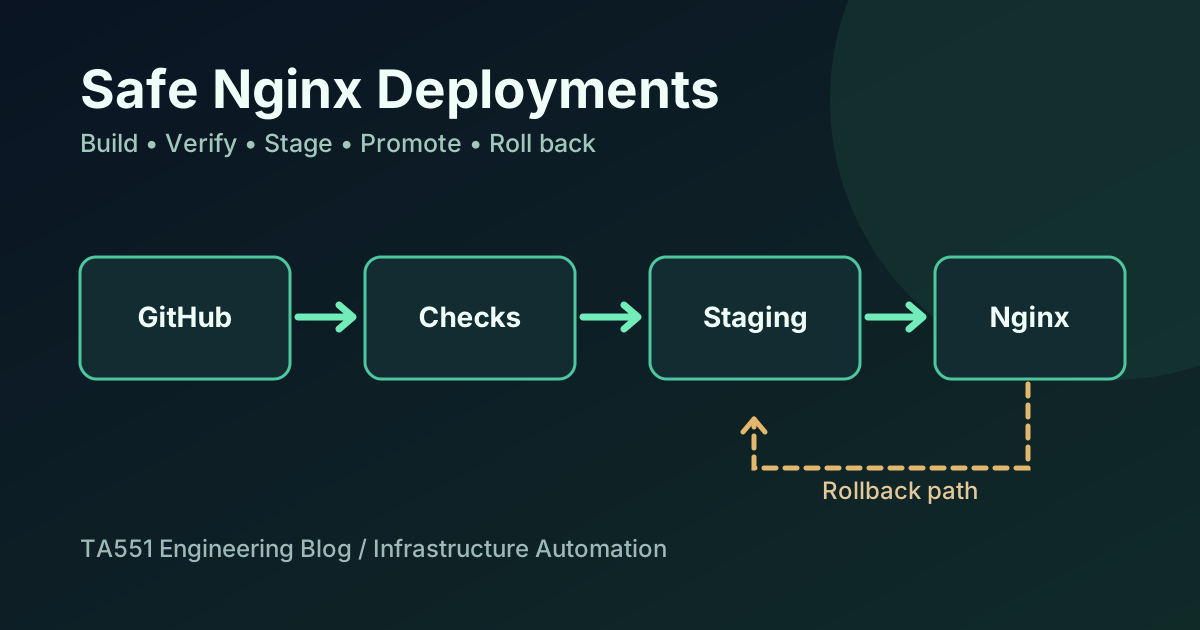
Reliable deployment also reduces incident impact. TA551 uses separate releases for the static portfolio and engineering blog. The blog deployment workflow stages a checksum-verified archive and switches only the blog’s release path after server-side checks. The portfolio uses an allowlisted static-file release mechanism that preserves the blog link and other protected resources.
This is a useful general pattern: do not use a broad delete-based synchronization command against a shared webroot. Review the manifest, stage the exact files, preserve unrelated services, run smoke tests, and retain a rollback target.
9. Capture evidence after every change
For each approved hardening change, record four items:
- Baseline: what the relevant setting or exposure looked like beforehand.
- Action: the exact configuration revision or change ticket.
- Verification: a successful syntax check, fresh login, relevant network check, and service response.
- Rollback: the known way to restore the previous working state.
For web workloads, a simple post-deployment smoke test can verify expected status codes:
for path in / /blog/ /sitemap.xml /blog/sitemap.xml; do
  curl -fsS -L -o /dev/null \
    -w "$path HTTP %{http_code}\n" \
    "https://ta551.info$path"
done
A successful HTTP 200 is availability evidence, not a complete security assessment. Authentication, authorization, log integrity, data handling, and recovery still require separate review.
10. What this checklist does—and does not—prove
This is a practical review workflow, not a CIS benchmark certification or penetration test. It does not automatically establish that a server is secure, compliant, resilient to every attack, or fully backed up. Every system needs a scope-specific threat model and an authorized review of the implemented controls.
My related work includes Linux and web infrastructure, a Wazuh security lab, and a hands-on SOC engineering case study.
Need help reviewing SSH access, Nginx, DNS, TLS, or an existing VPS deployment process? Send a short description of your system to [email protected]. I can start with a scoped review, evidence summary, and proposed changes before any live remediation.
TA551 / RELATED
Related articles
Automation
Safe Nginx Deployments with GitHub Actions and Rollback
An engineering case study of how I staged and verified a blog and portfolio update on a shared Nginx VPS without overwriting unrelated websites or API routes.