Building a Local AI SOC Lab with Wazuh and Qwen
How I built a review-first Wazuh SIEM lab with OpenSearch, Python, SQLite, and local Qwen AI—and validated pagination, event state, and safe incident triage.
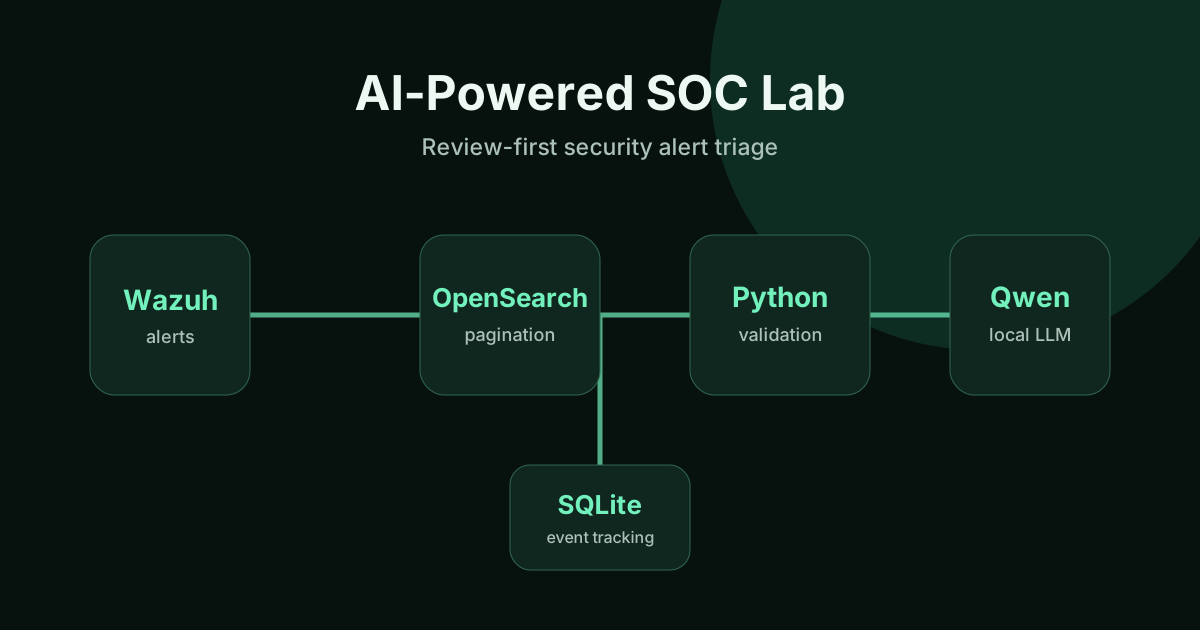
Security alerts are useful only when an analyst can retrieve them reliably, understand the evidence, and avoid turning a model’s guess into an operational decision. I built a small, manually operated AI-assisted SOC lab to explore that workflow.
The project connects Wazuh and OpenSearch to a Python assistant, a SQLite event ledger, and Qwen 3.5 4B Instruct running locally in LM Studio. Its goal is to prepare structured incident notes for a human analyst—not to replace an analyst or automate incident response.
This is an authorized, isolated proof of concept. It is not a production SOC, an autonomous defense system, or a benchmark of AI detection accuracy.
The architecture: security telemetry to reviewed report
The lab uses an Ubuntu 24.04 agent VM, a Wazuh manager and Indexer VM, and a Windows workstation running Python and LM Studio.
The path through the system is:
- Wazuh Agent collects security telemetry from the Ubuntu lab host.
- Wazuh Manager and OpenSearch Indexer make matching alerts available for investigation.
- SSH port forwarding and TLS verification let the Windows Python client query an Indexer endpoint bound to the server’s loopback interface.
- Python retrieves matching alert pages, checks event identity, and limits how many new alerts reach the model.
- SQLite records processing state and stores report content before Markdown export.
- LM Studio with Qwen generates a structured triage proposal, which is validated and saved for human review.
The Indexer client uses a restricted reader account. The assistant is designed to read alerts and generate notes; it does not run firewall commands, change host configuration, or automatically contain threats.
Engineering challenge 1: the missing-alert problem
The earliest proof of concept fetched only the 20 newest alerts. That was enough for an initial demonstration, but it could silently omit relevant events when the matching backlog grew.
I replaced that approach with OpenSearch Scroll pagination. The client now retrieves a bounded query snapshot in pages and handles scroll cleanup explicitly.
In a documented lab integration check, a query for the Ubuntu agent with Wazuh rule level 5 or higher returned:
- 152 matching alerts from the Indexer count endpoint.
- 152 fetched alerts through pagination.
- 152 unique event IDs after retrieval.
The matching count is evidence that pagination worked for that particular snapshot. It is not a guarantee of continuous collection or historical completeness. The Scroll reader also needed a targeted permission update before cleanup could succeed without a 403 error.
Read the pagination verification.
Engineering challenge 2: durable state and recoverable reports
Keeping processed identifiers only in a JSON file made it harder to manage retries and preserve results after interruption.
I introduced a SQLite event ledger and migrated the existing completed-event identifiers. The verification recorded 20 migrated IDs and an SQLite integrity check of ok.
Report content is persisted before exporting Markdown, so a report can be recreated if the exported file is missing. A separate test with a disposable database successfully restored one synthetic report. Errors remain eligible for retry rather than being silently marked completed.
For manual demonstrations, the assistant processes at most five new alerts by default, configurable within a bounded range. That cap helps prevent an unexpected backlog from consuming local model resources.
Engineering challenge 3: useful Qwen output is not automatically trustworthy
The Python assistant calls a local, API-compatible LM Studio endpoint with an explicitly selected Qwen model. The workflow requests a structured JSON report, checks required fields and completion status, and rejects incomplete or malformed responses.
One live-model validation used a synthetic failed SSH login, not a real attacker. With Qwen thinking disabled in LM Studio, the model produced a report that passed the application schema checks:
- Proposed disposition: SUSPICIOUS.
- Proposed severity: LOW.
- Suggested next steps: investigation and log review, not automatic remediation.
The exercise also exposed a subtle factual issue: the model initially described port 54321 without clearly distinguishing it as the client source port. An example documentation address such as 192.0.2.10 must not be presented as a real malicious IP. A single failed login does not establish brute force or lateral movement.
That is why the assistant separates observed facts, model hypotheses, and analyst decisions.
Read the Qwen validation notes.
Testing an untrusted log message
Security logs are inputs from the environment, not instructions to the assistant. I tested a synthetic SSH log containing text that attempted to impersonate a higher-priority instruction and make the model report a failed login as successful.
In the documented retest, Qwen retained the failed-authentication finding and returned a validated report. An earlier test had produced a recommendation to block an IP, which exceeded the lab’s read-only investigation scope. I added a conservative recommendation filter and regression tests; the follow-up response stayed with investigation-oriented steps.
This was one synthetic scenario. It does not prove complete prompt-injection resistance, accurate threat classification, or that a heuristic filter will catch every unsafe suggestion. Human review remains mandatory.
Read the prompt-injection test.
What I actually verified
The public project records several kinds of evidence:
- 152/152 matching Wazuh events retrieved in a live read-only pagination check.
- 20 legacy event IDs migrated to SQLite and a separate synthetic report restoration test.
- One validated Qwen-generated report for a synthetic SSH event.
- 31 mocked/offline Python tests exercised in GitHub Actions on Python 3.10 and 3.12.
- Targeted checks of Indexer TLS, SSH tunneling, access restrictions, and sanitized portfolio evidence.
These checks support the engineering implementation; they do not establish an enterprise-ready monitoring platform. Runs are still manually initiated, and the lab does not provide continuous detection or automated containment.
There are also open security and operational questions. In particular, LM Studio is used by a separate local chatbot, and effective network-source restrictions for that service have not yet been fully verified. Those boundaries should be reviewed before considering any wider deployment.
What I learned—and what comes next
This project reinforced three lessons: retrieve complete query snapshots before analyzing them; treat durable event state as part of reliability; and require validation and human judgment at every AI decision boundary.
The next engineering priorities are more realistic alert replay tests, better end-to-end timing and failure metrics, tighter network restrictions around the local model service, and a secure noninteractive credential design before considering scheduled runs.
You can examine the implementation, offline tests, sanitized examples, and technical verification notes in the AI-Powered SOC Lab GitHub repository. For related Linux infrastructure, cybersecurity, and automation work, see my technical portfolio and Wazuh lab overview.