Safe Nginx Deployments with GitHub Actions and Rollback
An engineering case study of how I staged and verified a blog and portfolio update on a shared Nginx VPS without overwriting unrelated websites or API routes.
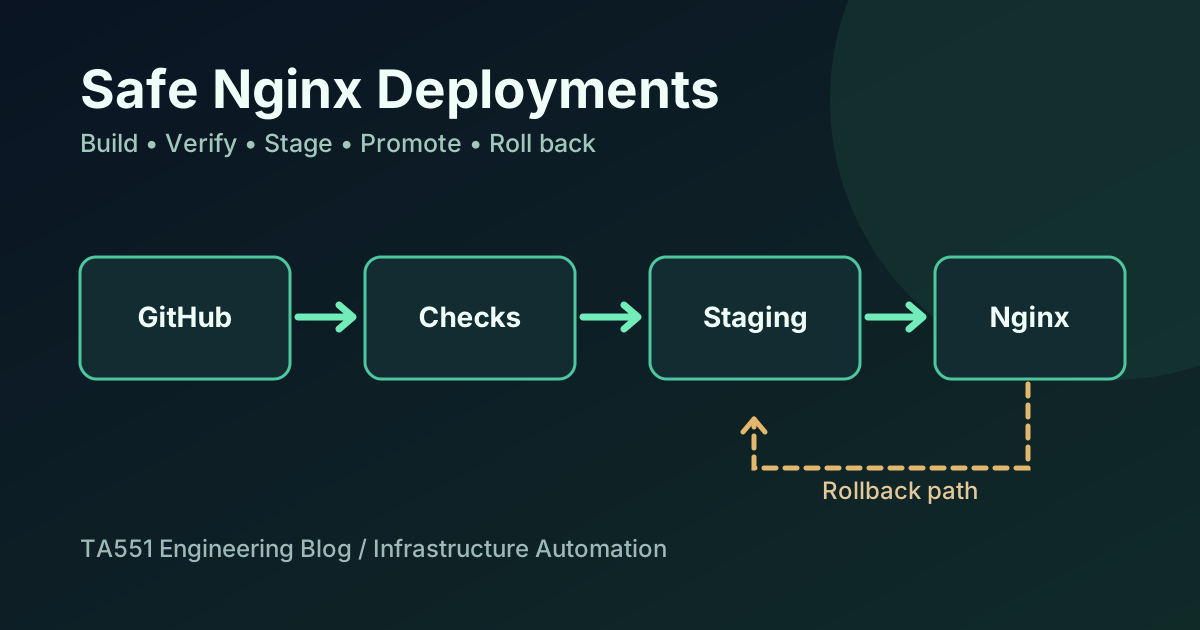
A deployment is more than uploading files. On a VPS hosting multiple websites, one careless command can break a blog, replace an unrelated application’s files, or disrupt routing for an API. That risk mattered when I added an engineering blog to my existing IT infrastructure portfolio.
My goal was specific: ship a new static blog and SEO updates to the main portfolio while preserving everything outside each release’s scope. I used GitHub Actions to validate and package changes, an unprivileged SSH account to stage artifacts, and a separately authorized server-side promotion step.
This is a case study of a deliberately manual, approval-gated deployment, not a claim that the setup is an autonomous CI/CD platform, a formal security audit, or a production availability benchmark.
The shared-host problem
The main portfolio and the engineering blog use the same public domain but different release boundaries:
- The portfolio manages a defined set of static HTML, CSS, JavaScript, and site-discovery files.
- The blog is a separately built static application served below the /blog/ path.
- Other websites, server configuration, and API routes are not supposed to change during either release.
A broad command such as synchronizing a generated directory into the entire Nginx document root with deletion enabled would have been a poor fit. It could remove files that belong to another application, even if the blog build itself were completely correct.
Instead, I designed two explicit paths: one release process for the blog and one for the portfolio.
Step 1: Keep builds separate from production access
A GitHub Actions run checks source code and produces a release candidate. It does not hold the VPS SSH key or publish directly to production.
The blog release build validates several independent properties:
- Dependencies install against a reviewed lockfile.
- Eleventy builds the public static site.
- Content lifecycle tests verify that Draft articles stay out of public pages, RSS, search data, and sitemap.
- Automated checks inspect generated headings, canonical URLs, and JSON-LD.
- Browser checks exercise the rendered output.
- The workflow creates a limited archive and a manifest recording its source commit and content hashes.
This separation matters operationally. A passing test means a candidate has passed a particular set of checks. It does not authorize deployment, and it does not prove the change will work on the live host.
Step 2: Identify exactly which artifact is being deployed
The release process ties together the repository, GitHub Actions run, the branch and commit, and the archive digest.
Before upload, a Windows PowerShell script uses authenticated GitHub CLI access to verify that the selected workflow run succeeded for the expected commit. It then checks the downloaded archive against its accompanying SHA-256 digest and release manifest.
A digest catches unexpected changes to the downloaded bytes. It is not a substitute for artifact signing, source review, or a trustworthy access-control policy. Those are separate concerns.
Using a specific immutable commit also avoids an easy operational mistake: downloading “whatever is latest” when several builds or branches exist.
Step 3: Upload to staging, not to the public document root
After validation, the artifact is transferred over SSH to a private staging area. The upload identity cannot promote the release on its own.
This is a useful trust boundary:
- A credential that can upload candidate files should not automatically have permission to replace a working website.
- Server-side extraction must reject unsafe archive paths, unexpected entry types, and files outside the approved output directory.
- A root-owned promotion helper reviews and installs only the approved release scope.
I also ran into a practical SSH automation issue: interactive SSH access worked, while a batch-mode script initially failed to authenticate. That was a client-side key-use problem, not proof that the server had rejected the public key. Explicit key selection, host-key checking, and the SSH agent were important parts of making the scripted staging path reliable.
Step 4: Use an atomic boundary for the blog
The blog’s server-side promotion step builds a root-owned release directory and then switches the live /blog/ symlink to that exact version.
That gives the blog a narrow promotion target without rebuilding Nginx or rewriting the surrounding portfolio files. The previous release target is retained so the promotion process has a known point to restore when a smoke test fails.
A separate portfolio deployment helper takes a different approach: it checks an allowlist of approved static paths, snapshots existing file contents for rollback, and explicitly guards the blog symlink and domain-verification file.
These two procedures deliberately differ because the resources they own are different. Neither is a justification for a sweeping webroot replacement.
Step 5: Verify the website people actually see
Successful file transfer is not the same as successful publication. After activation, I checked important HTTPS endpoints, including:
for path in / /blog/ /sitemap.xml /blog/sitemap.xml; do
  curl -sS -L -o /dev/null \
    -w "$path → HTTP %{http_code}\n" \
    "https://ta551.info$path"
done
For the October 14 rollout, the relevant homepage, blog, sitemap and portfolio routes returned HTTP 200 during manual verification. The blog’s production sitemap listed the blog index, its populated Cybersecurity category, and the Wazuh AI SOC article.
I also checked the otherwise empty AI category: it returned an HTML page but carried noindex,follow, and the category was absent from the public sitemap. This distinction matters: an HTTP 200 is not itself an instruction for search engines to index a page.
A status code is an availability check, not proof that all application features are correct. A full release verification would also include functionality checks specific to the systems involved.
Step 6: Make sitemap discovery explicit
The main site and blog generate separate XML sitemaps. The root robots.txt advertises both:
User-agent: *
Allow: /
Sitemap: https://ta551.info/sitemap.xml
Sitemap: https://ta551.info/blog/sitemap.xml
An interesting debugging moment came after the blog had been updated: I could load both sitemap URLs successfully, but the root robots file still advertised only one.
That was not a Cloudflare caching issue. The deployed portfolio state showed that the previous portfolio release was still active. After promoting the newer, verified portfolio artifact, both the local robots file and the public HTTPS response contained the two sitemap declarations.
The lesson is simple: before purging caches or changing a CDN configuration, check which version the origin is actually serving.
Sitemaps help discovery. They do not guarantee that Google will crawl, index, or rank a page; that requires separate observation through Search Console and search-performance data.
Step 7: Keep a rollback and evidence trail
A safer release process makes it possible to answer:
- Which commit and artifact were promoted?
- What files did that artifact contain?
- Which paths could the release change?
- What did the live checks show?
- Which previous version can be restored if the new release fails?
For this rollout, the blog release and the portfolio release each had explicit identifiers. I checked the active state and compared the origin and public robots responses after promotion. I did not need to run a broad cleanup command, restart unrelated services, or change other Nginx virtual hosts.
Retaining a previous release helps recovery, but rollback should still be verified; it cannot repair every category of application failure or data migration issue.
What I would improve next
The working process is intentionally conservative and still manual. Next engineering improvements could include a read-only post-release verification report, stronger artifact attestation, documented restore drills, and more comprehensive application-level smoke tests. Any additional automation should preserve the separation between building a candidate and granting production authorization.
For teams with a small Linux VPS, the larger principle is more valuable than the particular tools: know what each release owns, verify what you downloaded, change the smallest possible surface, and confirm the public result before declaring success.
I also document work on Wazuh and locally hosted AI and remote Linux and Windows IT infrastructure.
Need help with Nginx, DNS, HTTPS, or a safer VPS deployment process? Send the scope of your project to [email protected]. I can propose an evidence-based review and an appropriately limited change plan.
TA551 / RELATED
Related articles
Linux
Linux Server Hardening: A Practical Review Checklist
A practical, evidence-first Linux VPS security checklist covering SSH access, least privilege, exposed ports, Nginx, TLS, updates, logging, backups, and safe deployment.